Classic checkout
How the plugin integrates with WooCommerce's shortcode-based classic checkout.
If your checkout page uses the [woocommerce_checkout] shortcode, you’re on the classic checkout. This is the default for stores that haven’t switched to the Cart and Checkout blocks. You can tell at a glance: if your checkout looks like WooCommerce has always looked, with WooCommerce’s own default styling, you’re on the classic one.
The plugin works on classic checkout with zero configuration. Once you’ve entered your license and Google API key, you’re done.
What your customer sees
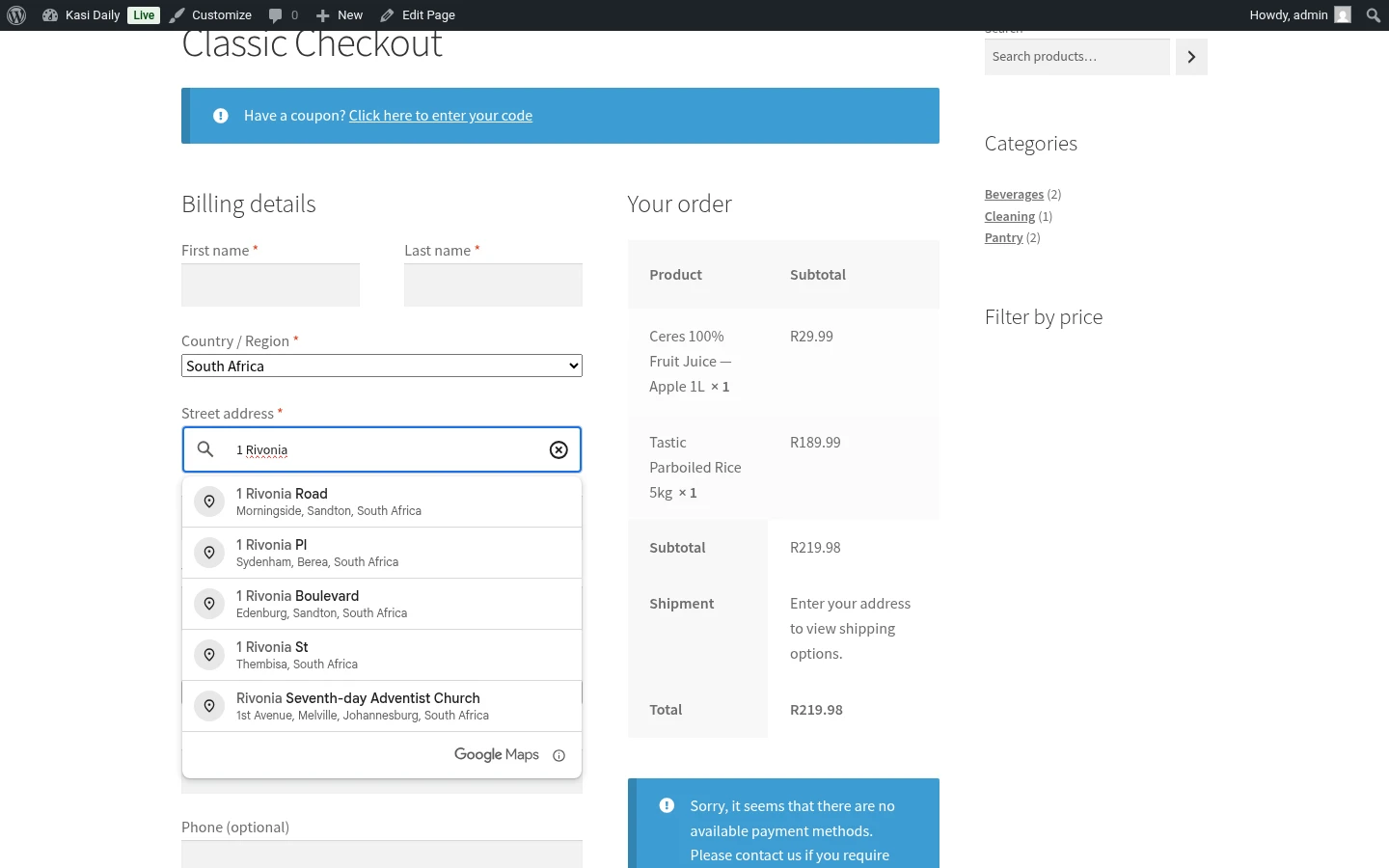
When a customer starts typing in the Street address field, a dropdown of SA address suggestions appears. They pick one, and the plugin fills in the rest of the fields automatically:
- Town / City, populated from Google’s response
- Suburb (what WooCommerce calls “Address line 2”), populated from Google’s response
- Province, set to the correct SA province
- Postcode, filled from the selected address
Suburb is required
The plugin relabels the Address Line 2 field to Suburb and makes it a required field for customers ordering to a South African address. If a customer tries to submit the checkout with the Suburb empty, WooCommerce blocks the submission and shows a red error message.
This is the core reason the plugin exists. SA couriers match delivery rules against the suburb, an empty suburb means “no shipping options available” and an abandoned cart.
The relabel only applies to SA addresses. If you sell internationally and a customer picks a different country, WooCommerce’s standard “Address line 2” label and optional behaviour comes back.
What happens if Google doesn’t recognise the address
Not every SA address is in Google’s database, especially in informal settlements and rural areas. If Google doesn’t return a match:
- The customer can still type the address manually, the autocomplete is an assist, not a requirement
- The Suburb field stays required, they can type the suburb name themselves
- Nothing breaks. The order goes through on whatever the customer types
See the Troubleshooting guide for rural / informal address behaviour.
What happens if your Google key isn’t set up
If you haven’t entered a Google API key yet, or if the key is wrong, the autocomplete dropdown simply doesn’t appear. The checkout still works, customers can type their address the old way.
This is a deliberate choice. A missing key should never stop your customers from checking out.
Once the key is in and working, the autocomplete comes back automatically.
Guest checkout vs logged-in checkout
The plugin works the same either way. Logged-in customers whose saved address is pre-filled into the checkout still get autocomplete if they change the street address.